Upload a dataset
Drop in a file and it becomes a dataset your agents can query immediately:- Tabular — CSV, Excel (
.xlsx,.xls) - Documents — PDF, Word, PowerPoint, Markdown, text, JSON, and more
Who can use an uploaded dataset
By default a dataset you upload is available to your whole organization, so agents and teammates can start working with it straight away. When you upload from the Data page you can instead choose Only me, which keeps the dataset private to you — useful for scratch data or anything you’re not ready to share. A private dataset stays out of the project you have selected too — it is not added to the project’s resources, so project members don’t inherit access to it. A private dataset can be opened up later from the share menu in your datasets table, so the choice at upload time is never final.What Erdo works out on upload
For tabular data, the analysis goes well beyond “read the first row as headers”:- Schema & types — every column is profiled and typed (number, date, text, boolean), with null counts, distinct-value counts, and ranges.
- Messy real-world files — Erdo finds the actual header row in
report-style exports that start with titles, logos, or blank rows, and merges
multi-row headers (e.g.
Revenue / Q1,Revenue / Q2) into clean column names. - Number formats — thousands separators, currency symbols, percentages, and
accounting-style negatives like
(1,234)are recognised as numbers, not text. - Currencies — an ambiguous
$column is resolved using nearby country/region columns where possible, so totals aren’t silently mixed. - Time series — date columns get their range and gaps detected, so an agent knows when a month is missing before it reports a trend.
This upfront analysis is why an agent can answer a question about a freshly
uploaded file straight away — it already knows the columns, types, and quirks.
Connect a source
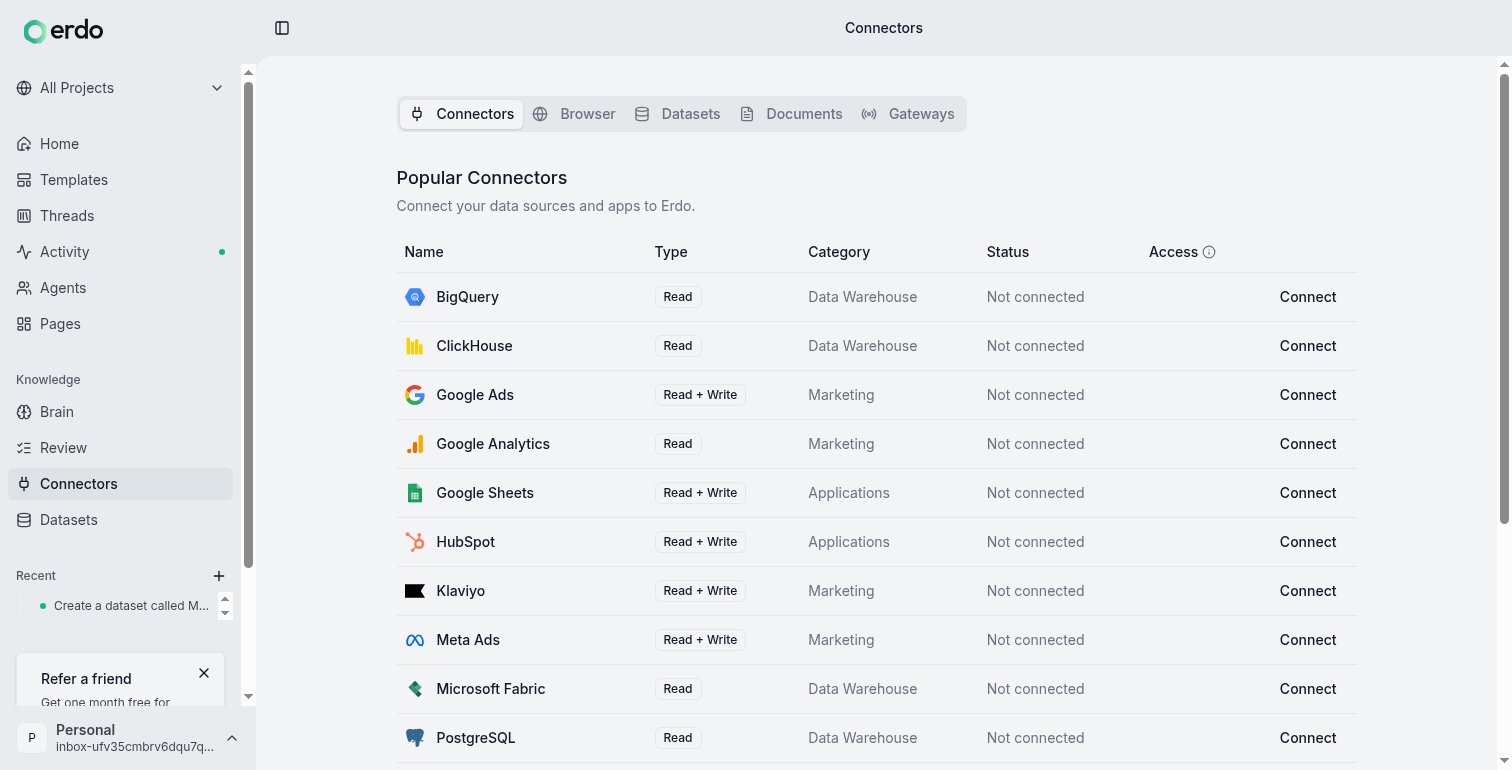
A connector is an authorized link to an external tool or system — your database (PostgreSQL, Snowflake, BigQuery, ClickHouse), Google Workspace, Slack, Shopify, Stripe, GitHub, and many others. Connecting one lets agents read from it and, with your approval, act in it. Connect Meta Ads, for instance, and agents can read across the account — listing the Business Manager portfolios you belong to, the Facebook Pages available for ad creatives, the conversion pixels already in place, and the Instant Forms on a page along with the leads they’ve collected — while anything that changes the account, such as creating a new pixel, uploading a video to the ad account’s library for a video ad, or creating an Instant Form for a lead ad, waits for your approval first, as every Meta Ads write does.1
Open Data → Connectors
Find the tool you want and click connect.
2
Sign in and authorize
Authorize through the provider. Connections are per user and encrypted —
each person connects their own accounts.
3
Use it in a thread
Agents can now pull from the source. Sources that sync (like a database or a
store) turn their tables into queryable datasets,
schema-analyzed just like an uploaded file.
Dataset vs. connector: a connector is the source (the authorized link); a
dataset is the queryable data that lands in Erdo. One connector can produce many
datasets. In day-to-day use you’ll mostly think in terms of “connect Shopify” and
then “query my Shopify orders.”
Connect a data lake
If your data is parquet files in object storage (GCS or S3), connect it as a data lake and Erdo queries it in place — no copy, no warehouse. Each folder under your lake root becomes a queryable table.Connect a custom API
If a tool isn’t in the gallery but has an API, point Erdo at its API docs and an agent will generate a client for it. You then connect with your API key and query it like any other source — no code to write yourself.Bring your semantic layer
If you’ve already defined your business model in dbt, LookML (Looker), Power BI, or Tableau, you don’t have to redefine it in Erdo. Import the model and Erdo turns it into knowledge your agents share:- Metrics — measures and their formulas (revenue, ROAS, CAC) become canonical definitions, so every agent computes them your way.
- Entities & dimensions — your business objects (campaigns, orders, customers) and their fields, mapped back to the tables they live in.
- Relationships — join conditions between models are preserved, so agents know how your tables connect.
- Row-level security — access filters from LookML carry over as mandatory query constraints, so agents respect the same boundaries your BI tool does.
How agents query your data
You never write the query — you describe what you want, and the agent picks the right path:- SQL for direct questions over a dataset or synced table — fast filtering, joins, and aggregation. Results come back as a new dataset you can query again.
- Python for multi-step analysis, statistics, and API-only sources (like Google Analytics or ad platforms) where a single SQL query won’t do.
Getting answers right
This is where Erdo is different. An agent doesn’t just run a query and report whatever comes back — it digs in and checks its own work before showing you a result: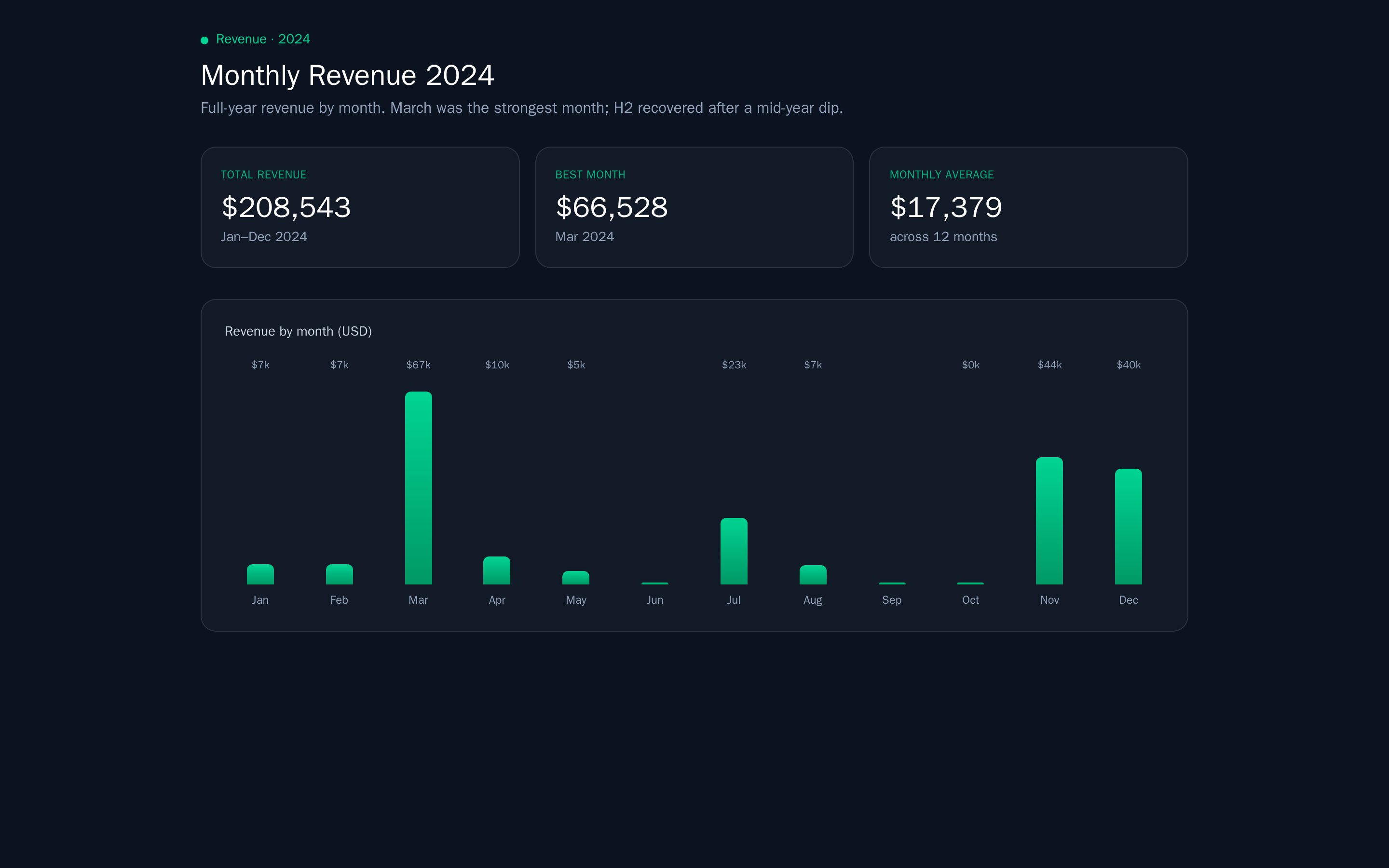
- Does this answer the question? A separate quality check confirms the analysis addresses what you actually asked — the right metric, the right grain, the right time window — not a plausible-looking proxy.
- Trust the data, not the assumption. If the data disproves the obvious approach (a join key that’s empty, a column that doesn’t exist, a filter that returns nothing), the agent adapts and re-runs instead of forcing the original plan.
- Catch the silent failures. Empty result sets, all-zero or all-null columns, suspiciously small counts, and contradictory totals are flagged and investigated rather than presented as fact.
- Decision-quality verdicts. For “did this work?” questions — experiments, launches, funnels — Erdo insists on comparable before/after windows and a real primary outcome, so a rise in vanity activity doesn’t get reported as success.
- Validated refreshes. When a synced dataset refreshes, Erdo checks invariants like key uniqueness so a broken sync doesn’t quietly corrupt later answers.
Charts and tables in the conversation
An answer that has a shape worth seeing arrives as a real chart or table in the thread, not a block of numbers in prose. Both are live components — a table sorts, filters, and exports; a chart has tooltips, a legend, and its own axes — and both are drawn with the same components Erdo uses on published pages, so a chart you liked in a conversation looks the same when it lands on a dashboard. Charts use your brand’s colours. If your workspace has a Brand Style record — the knowledge object that holds your colours, typography, and imagery, written when Erdo samples your site — the agent takes the series colours from that palette: your primary colour for the leading series, your supporting tones for the rest. A chart from your workspace looks like your work, which matters the moment it leaves the thread and goes into a deck or an email. Meaning still outranks brand. Where a colour carries information — red for a loss, green for a gain, traffic-light colours for status — the agent keeps the conventional colour even if your palette says otherwise, because recolouring a loss in your brand’s warm orange would make the chart harder to read, not more on-brand. Workspaces with no Brand Style record get Erdo’s default palette, and nothing about the chart changes. Take a chart with you. Every chart carries a download button in its top-right corner that saves it as a PNG — the fastest way to move a result out of Erdo and into a slide, a document, or a message. For the underlying rows rather than the picture, use the table’s export or ask for the dataset directly.Tables and scratch datasets
Not every dataset is meant to stick around. Erdo distinguishes two kinds:- Tables are the durable datasets your flows and uploads write to — your leads, your campaign metrics, a file you brought in. They’re the data you come back to, so they’re what listings show by default.
- Scratch datasets are analysis by-products: the intermediate result of a
question an agent worked through, a one-off export, a
sql_resultsfile. They pile up fast and you rarely need them later, so they’re hidden from dataset listings by default to keep the durable data easy to find.
class=all (or
class=scratch for only the by-products); on the CLI, erdo datasets list --class all. A dataset you address directly by slug always opens regardless of
its class.
Integration-backed tables also carry canonical provenance in dataset list,
search, and detail responses. It identifies the source connection and provider,
the connection’s current status and account scope, the dataset’s effective
selection, and (for synchronized tables) effective and raw sync status, last
successful sync, last error, expected next sync, and partial-resource outcome
metadata. metadata_status is partial or unknown when Erdo could not
resolve all of this state; missing metadata never means the connection is
active. External consumers can tell a current source from a historical snapshot
without guessing from a dataset name or creation date. The older top-level integration_id,
integration_config_key, and sync_status fields remain for compatibility.
The provenance fields are provider-neutral: the dataset API does not grow
separate campaign, ad, invoice, or contact endpoints.
For a dataset with several tables, read its schema and pass the selected
resource’s key as resource_key to the ordinary dataset query. For file
datasets (CSV/Excel), the SQL table is named data; for synchronized API
integration datasets, the SQL table name matches the resource name (e.g.
campaigns, orders).
The class isn’t fixed: if a durable table was mistakenly filed as scratch (or the
reverse), pass class (table or scratch) to the update-schema surface —
POST /v1/datasets/{id}/schema or the update_dataset_schema tool — to
reclassify it; omit it to leave the class unchanged.
Declared schemas
A table can carry a declared schema — a column contract that says which columns the table has, which are required, what type each holds, and optionally which stable platform meaning a column carries. It exists so that anything reading the table (your app, a report, another agent) can read the column list once from the schema instead of guessing at names, and so writes stay consistent instead of quietly growing a new column every time a payload changes. A table’s schema is set the first time it receives data — the columns of that first batch become the contract — and you can declare or change it explicitly at any point. Ask the agent, or use the schema tool directly: adeclare_schema
operation replaces the whole contract, and add_column / rename_column /
remove_column / alter_column_type evolve it a column at a time. The declared
schema is returned alongside a dataset’s columns on the schema endpoint
(GET /v1/datasets/{id}/schema and the get_dataset_schema tool).
For an application that repeatedly produces the same table, use
erdo_ensure_dataset (or POST /v1/datasets-ensure) during setup. A purpose
selects the organization dataset and the declared schema states the producer
contract; Erdo creates, reuses, or explicitly adopts that dataset and returns it
only when both agree. Purpose discovery returns the current dataset and this
same declaration together, so applications do not maintain a second schema
registry.
That works before the table holds anything. A table you have just created has no
data and no contract yet, so there are no columns for add_column to add one to
— declare the columns first with declare_schema (in the same request is fine,
declarations are applied before the column operations), or write a row and let
the columns come from it. Either way the first write lands in a table shaped by
the contract: a column you declared but did not fill is present and empty, not
missing.
Semantic roles for qualified leads
semantic_role lets a consumer discover a fact by its declared meaning instead
of guessing a physical column name or parsing a translated form label. The
validated lead vocabulary is:
canonical_lead_key— requiredtextqualification_captured_at—datepurchase_intent—textbudget_min_usd_cents—integerbudget_max_usd_cents—integerqualification_contract_version—integerbuyer_role—text; optional per row, but when present exactlydirectorbroker
buyer_role is independent and may be declared without that group,
but its declaration also requires the canonical lead key because its first value
is preserved per lead.
Physical names can differ; read semantic_role from the existing schema
response rather than matching names.
For canonical qualification rows, the group is optional as a whole (so an early
partial lead capture remains valid) but all-or-none once any fact is present.
Purchase intent is exactly buy or rent; budget bounds are non-negative integer
USD cents with minimum no greater than maximum; the timestamp is RFC 3339 and the
version is exactly the current supported version (1). Writes to a declared
qualification dataset must upsert on the physical column carrying
canonical_lead_key. Erdo stamps the server receive time and current version
when all three submitted qualification facts are complete (using an event’s
recorded receipt time for event-pipeline writes), and
keyed writes preserve the first complete qualification group. These semantic
checks are hard failures even for normally lossless form capture: malformed
qualification must be fixed at the producer rather than stored as trusted facts.
When a producer declares buyer_role, Erdo also rejects any non-empty value
other than the exact machine values direct and broker; it never derives the
role from translated or display answers. The field may remain empty when the
producer has no canonical role evidence. On a keyed write, the first non-empty
role is preserved as its own fill-once group, independently of the five-field
qualification group. A later partial capture therefore cannot erase a complete
qualification just because role is empty, and a complete qualification cannot
prevent a later role capture.
Declaring roles does not interpret or backfill older rows. Activation is allowed
only on file or PostgreSQL storage, with no refresh configuration, and only when
each newly proposed immutable column is empty in every stored row. Existing lead
pipelines must all be moved to the canonical key before the roles are declared;
after activation, capture writes are the only writer and bulk file replacement is
refused. Use fresh empty physical columns when adding the contract to an existing
dataset.
Once a table has a declared schema, writes are held to it — but how a mismatch is
handled depends on where the write comes from, because dropping a real submission
is never acceptable:
- API and agent writes with columns the table doesn’t declare, or missing a
required column, are rejected — the error names the offending columns so you
can add them to the schema (
add_column, or a newdeclare_schema) and retry. This keeps deliberate writes from silently drifting the schema. - Form and event captures (a landing-page lead form, an event pipeline) are never dropped: the record is written as submitted even if it doesn’t match, and the mismatch is recorded on the dataset’s timeline as an event naming the columns that drifted. You keep every lead and still get told the schema moved. The exception is a malformed declared semantic fact group, which is rejected rather than accepted as canonical evidence.
The contract can never omit a column the table already stores
A scratch dataset carries no contract, so its writes widen it freely; a form capture keeps a column it was never told about; and Erdo stamps a row-created column onto every new row without asking. Any of those leaves a table holding a column no contract mentions, and the moment something starts enforcing that contract, the table refuses the very column its own rows carry — whileadd_column refuses too, because the column is there already.
So a contract is reconciled with the table whenever you change how its columns
are governed: a class change, a column operation, or a declare_schema. Columns
the table holds that the contract omits are appended to it, and the response
names them in contract_reconciled_columns so the change is never silent. Your
declared columns are untouched — their order, types, required flags and semantic
roles all stand — and the table’s data is not moved or rewritten.
This is why add_column for a column the table already holds succeeds instead of
failing: the table needed nothing, the contract needed the column, and that is
what happens — including the column_type you gave it, which is recorded for the
column exactly as alter_column_type would record it. Column analysis refreshes
afterward so dataset details show the requested type, even when no CSV bytes
changed. It is refused only when the contract declares the column too, which is the genuine mistake it always was. It
also means you never have to name Erdo’s own row-created column in a
declare_schema — declare the columns you care about, and the table’s own are
added back.
The reconciliation is not limited to the tools you drive by hand. Wiring a flow to
capture into a table promotes that table on every save, and a promotion is exactly
when a lagging contract starts being enforced — so it reconciles first, and a
table your pages write to is never left in a state you would have had to repair by
hand. Page-event declarations, first-write contracts and startup backfills use the
same reconciliation. Repeated sparse captures retain existing column definitions
and columns already stored in the table.
Filtering what shows up
A filter is a saved rule on a dataset that hides rows you don’t want to see by default. Once you add one, it applies everywhere that dataset is read — lead lists, dashboards, public pages, and the agent’s own queries — including counts and totals, not just the row list. Filters are the right tool whenever a dataset accumulates rows you’d rather not look at by default. The most common case: keeping test and QA submissions out of a landing page’s real leads — you capture everything, then filter out the test rows by a value they share (a test email, a flag, a source). Other uses: hide a status (status is archived), or scope to a window (created_at after a date).
You don’t manage filters by hand — just ask:
“Add a filter to the leads dataset to hide submissions from anyone testing — their
emails all end in @example.com.”
The agent adds the filter (you can also list or remove them), and from then on every
view of that dataset excludes those rows. Need to see everything again — including the
filtered rows — for a one-off check? Ask the agent to query with filters off, or remove
the filter. Filters hide rows from view; they never delete anything.
You can also manage filters yourself — in a dataset’s settings, or from the CLI, MCP, and
REST API. See Filters for every way to add, list, and remove them.
A refresh that goes wrong is recoverable for the same reason: a file dataset keeps the
contents each replacement overwrote, so the version from before a bad rebuild is still
readable. See Dataset revisions.
Some sources also let you scope what comes in right in the segment picker when you connect,
and where a source is hierarchical Erdo groups those choices by the container that owns them.
Connect Meta Ads, for instance, and you choose one ad account for the connection, with
each account listed under the Business Manager that owns it — accounts outside any business
appear under a “Personal” group. Erdo remembers the owning business alongside the account, and the
connection is named after your choice. Working across several ad accounts is just several
connections: connect Meta Ads once per account.